
Key Changes
Shift the key and let the whole piece follow — hear it in a new light instantly.
iOS · iPadOS · Android
Tap notes onto the staff and hear them instantly. Learn faster. Create freely.
Learn
Every note you tap sounds instantly. With rainbow notes, each pitch has its own color. Made for kids, adults and music classes.

Recognize
Automatic note and chord recognition, live as you play — so theory clicks while your hands are still moving.

Keys
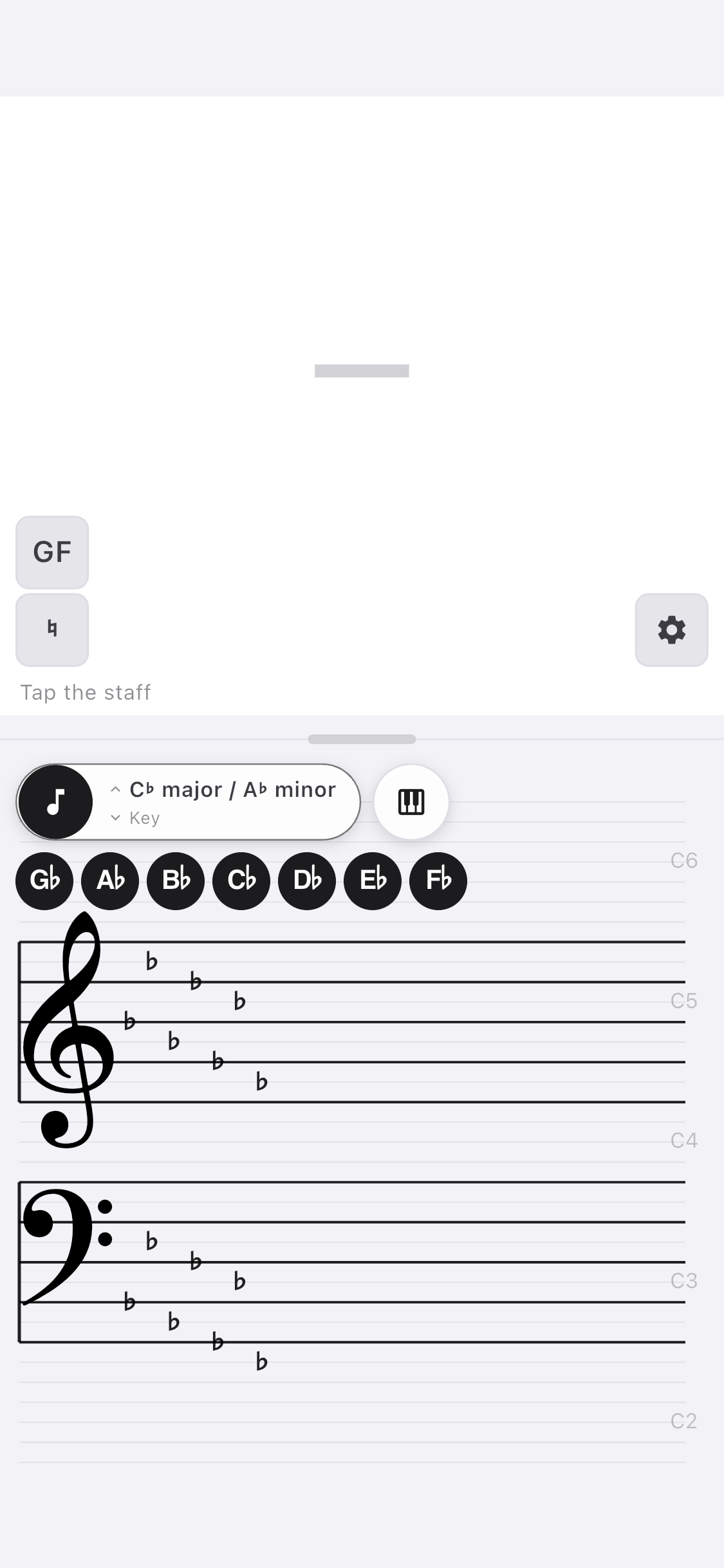
Pick a key and the staff shows its sharps and flats.
Sounds
Spin the wheel to pick a sound — every instrument numbered just like on your keyboard, favorites first.

Understand
Start
Notes, staff and all instruments — the core that helps you learn and play stays free, for as long as you like. No timer. No catch.
Just Play
Plug in a MIDI keyboard or tap the staff. No arming, no setup — you play, it captures. Nothing between the idea and the sound.

Grow Ideas
Layer instrument on instrument and watch a single idea become an arrangement. This is a studio that thinks like a sketchbook.

Sing
Import a MusicXML or MIDI file with lyrics — straight from your notation app — and Tap The Tone plays every voice in its own color while the words light up syllable by syllable. Verse after verse, ready for choir practice.

Experiment
Shift the key and let the whole piece follow — hear it in a new light instantly.
Bring your own SoundFonts (SF2 · SF3 · SFO). Your instruments, your sound, your palette.
Tighten timing to any grid — from whole notes to 1/128 — without losing the feel.
Take It Anywhere
Import and export MIDI and MusicXML, or bounce to WAV and M4A. Move your ideas straight into any DAW or notation app — anywhere you finish music.
Built Around MIDI
Every session is written to MIDI continuously — even when you never press record. Every track stays available. That idea you almost forgot? It's already saved.
Own It
No subscription. No renewals. Pay once and it's yours — including 12 months of new features. Add the Update Pass later only if you want to.
Free
The core, forever.
One-time
Everything, owned outright.
Optional Update Pass extends new-feature access by another year — never required to keep what you own.
Voices
Real reviews from the App Store and Google Play — critical ones included. Unedited, except where marked with […].
eğlenceli ve eğitici beğendim
Çok teşekkürler! Tap The Tone’u hem eğlenceli hem de öğretici bulmanıza çok sevindim. Türkçe çevirisi de faydalı olur muydu?
nice
Thank you! Tap The Tone lets you tap notes on the staff and hear them instantly, explore instruments, discover chords and customise note colours to learn easier. You can also use a MIDI-Keyboard. With Pro, you can import MusicXML files with lyrics, use karaoke mode, record music via MIDI and much more. Have fun learning and making musik!
it works. can't create folder to save stuff. it just says can't create folder as if there is a permission issue where it is trying to create it
Thanks for the 5 stars! It may be that Android is trying to save the sessions in Android/data/… and is blocking access. You could also try switching to Documents or Google Drive when choosing the folder. I’ll release version 1.0.6 soon, which should fix this issue. 1.0.6 is released.
Ich finde diese App sehr geeignet für den modernen Musikunterricht an Sonderschulen
Es wäre super hilfreich, wenn jeder Ton eine andere Farbe hat. 🙃 […] Wäre dies möglich? ☺️
Vielen Dank für die tolle Rückmeldung! Deine Idee ist mit Version 1.0.6 umgesetzt. Die Regenbogen-Noten kannst du selbst einfärben. Aktivieren und ändern in Einstellungen. Wenn du magst teile Tap The Tone mit Lehrpersonen, Schülerinnen und Schülern, Mütter und Väter, die die Kids beim Musiklernen so einfacher unterstützen können.
Questions
Yes. Connect a MIDI keyboard over USB or Lightning. Tap The Tone detects it automatically — with velocity, sustain pedal, pitch bend and mod-wheel vibrato. Settings shows every key that comes in.
No account — ever. You can play and create without a connection. Recordings are saved to your device or your personal iCloud / Google Drive; either way they stay in your own space and are never sent to us.
Yes — Pro imports standard MIDI files and MusicXML scores from notation apps. Repeats are written out, accidentals stay as in the score, and you can swap the instrument of each voice.
Yes — in karaoke mode (Pro), the lyrics from the MIDI or MusicXML file run along during playback, syllable by syllable. With several verses, the first pass shows verse one, the second pass verse two.
Export MIDI, MusicXML, WAV or M4A and drop it straight into any DAW or notation app. Your MIDI keeps its lyrics, title and composer.
The full learning core: notes and staff, all instruments, live note & chord recognition and rainbow notes — free forever.
Six tracks, karaoke mode, MIDI and MusicXML import & export, audio export, SoundFont import (SF2 · SF3 · SFO), metronome, quantization, undo/redo — the tools for creating and experimenting.
With Pro, import your choir's MIDI or MusicXML and set the volume of each voice — bring your part forward, turn the others down, and sing along with synced notation.
With Pro, transpose your whole recording to any key instantly.
No. Pro is a one-time purchase. Buy it once and it's yours forever, including 12 months of new features.
Yes — try Pro free for 30 days. No login, no commitment. It never renews automatically: when the trial ends, the app simply returns to Starter and you keep everything Starter offers.
Optional. It extends access to newly released features by another 12 months. You always keep every feature you already own — the Pass is only for future additions.
Correct. Sessions are written to MIDI continuously, so even unplanned playing is captured. Every track stays available, as long as you selected a folder to save to.
iPhone and iPad (iOS 15.6+), Mac with Apple silicon (via the App Store) and Android (7.0+). Optimised for both phone (portrait) and tablet (portrait and landscape).
12 languages: English, German, French, Italian, Spanish, Portuguese, Ukrainian, Russian, Japanese, Korean, Chinese and Finnish — with note and key names written the way each language does.
Yes — import your own SoundFonts (SF2 · SF3 · SFO) to play with custom instruments.
No tracking, no analytics, no ads — and nothing on our servers. Your recordings stay in your control. See the Privacy Policy for details.
Free to start. Nothing to lose but the silence.